Can I switch to GOMO Broadband before my current contract ends?
Disclaimer: Information is accurate as of 12 October 2026 and may be subject to change. Please visit the GOMO broadband website for the latest details.
Thinking of switching broadband providers in Singapore? This guide explains when you can change providers, how to minimise downtime and what to check before moving to GOMO Broadband.
Can you switch to GOMO Broadband before your current broadband contract ends?
Yes, you can sign up for a new broadband plan before your existing contract expires.
However, ending your current service before the minimum contract period is over may result in early termination charges, depending on your current provider’s terms.
If you’re considering switching to GOMO Broadband, you may be able to activate your new service while your current service is still active. This depends on your address eligibility and whether there is an available port on your Fibre Termination Point (FTP), the fibre connection point in your home. GOMO Broadband offers 10Gbps fibre broadband for homes in Singapore, powered by Singtel’s network.
Planning your switch in advance can help reduce the risk of downtime and make the transition smoother.
In this guide, you’ll learn how to:
What should you check before switching broadband providers?
A little preparation goes a long way. Use this checklist to understand your current contract, plan your new broadband activation and reduce the risk of downtime when switching providers.
Quick Check | You are ready when... |
|---|---|
| Your current contract | You know your contract end date and whether early termination charges apply. |
| Your notice period | You know how much notice your current provider requires before termination. |
| Your home FTP availability | Your new provider has confirmed whether a port on your FTP is available for activation. |
| GOMO Broadband eligibility | Confirm that your address is eligible for GOMO Broadband service. |
| Your new broadband activation | You understand what needs to happen before your new service goes live. |
| Your equipment | You know whether your current equipment needs to be returned and what equipment comes with your new plan. |
| Your preferred handover and overlap costs | You know whether an overlap is possible, and have budgeted for any period when both services are billed. |
Once you know these details, you can choose a switching date with much more confidence. Explore GOMO Broadband plans and check your address during sign-up.
Why should you plan your broadband switch before your contract ends?
Waiting until your broadband contract has completely ended before looking for your next plan may seem like the obvious move. However, you could end up paying for another month with your current provider while your new broadband gets set up.
Where your home’s FTP allows it, switching before your current contract ends can give you time to make sure the new connection is working before the old one disappears.
If you are switching to GOMO Broadband, having an available port on the existing Fibre Termination Point can allow the new service to be set up while another broadband service is still active.
A visual inspection can help you identify an unused port on your Fibre Termination Point. However, an empty port does not necessarily mean it is available for service activation.
Enter your installation address during GOMO Broadband sign-up and ask GOMO to confirm port availability with NetLink Trust (NLT).
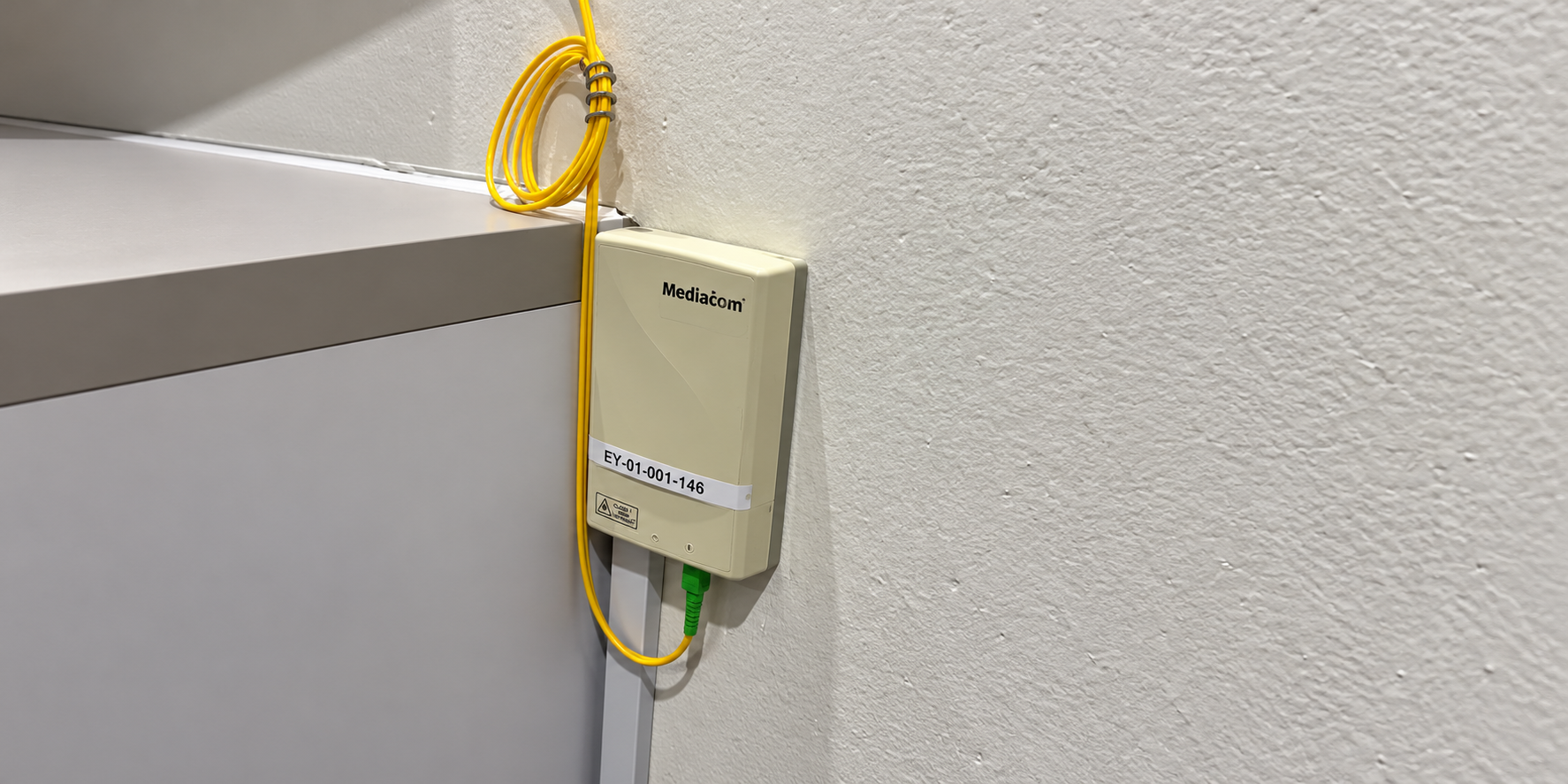
Example of 1 free port (left) and 1 occupied port (right)
How can you switch broadband providers with less downtime?
There is no single switching timeline that works for every household, but the process can be broken down into a few simple stages.
Before you switch
Check your existing broadband contract for:
Then check whether your address is eligible for the new broadband service and understand what is required for activation. Read the GOMO Broadband sign-up requirements before placing your order.
Before you cancel your existing broadband
If you’re switching to GOMO Broadband, check your address eligibility and fibre setup first.
Where your setup supports an overlap, you may prefer to keep your existing broadband active until your new connection is ready, before terminating your current service. Allow for any overlap charges and follow your current provider’s notice requirements. See what happens after signing up for GOMO Broadband to understand the next steps.
Once your new broadband is active
Connect your usual devices and check that your home internet is working as expected.
Here’s a tip: using the same WiFi name and password as your previous network may help some devices reconnect automatically. This also depends on compatible security settings and device support. Check that your devices connect successfully after setup.
Once you’re satisfied with the new connection, terminate your previous broadband service according to your existing provider’s contract requirements.
What happens if both Fibre Termination Point ports are occupied?
If both ports are occupied, an additional Fibre Termination Point may be needed if you want to keep your existing services. Additional charges and a longer setup time may apply. Confirm the requirements, fees and expected timeline with GOMO before proceeding.
Alternatively, you may be able to terminate one existing service to free up a port. Speak to GOMO and your current provider before doing so, as this can affect your switching timeline and cause downtime. Check any early termination charges before cancelling.
Terminating your existing service may not release the port immediately. Your previous internet service provider (ISP) needs to release it through NetLink Trust before it can be used for your new service. Confirm the port-release and activation dates with both providers.
Remember to check your new service requirements before cancelling your existing broadband. This can help you plan the handover and reduce the risk of downtime.
Which GOMO Broadband plan suits your home internet setup?
Here is a quick starting point:
If your broadband switch looks like.. | Recommended GOMO Broadband plan | Why it fits |
|---|---|---|
| You prefer to have a router and professional installation included | GOMO 10Gbps Value Saver | 24-month contract, with a WiFi 7 router, NLT activation and professional installation included |
| You already have a compatible router and prefer a shorter commitment | GOMO 10Gbps Core Saver | 12-month contract, with NLT activation included. Use your own compatible router; router and professional installation are available as add-ons. |
From the GOMO Team 💡
When planning your switch, work backwards from when your new broadband can be activated rather than only from when your current contract expires.
Before choosing a switching date, check:
Where your setup allows an overlap, keeping your existing broadband active until the new connection is working may help reduce the risk of downtime. Ready to make the switch? Explore GOMO Broadband plans.
What else can make switching to GOMO Broadband easier?
Once you have worked out your switching timeline, a few other choices can make your next setup more straightforward.
Choose the setup support you need
Prefer to have the router and installation included? GOMO 10Gbps Value Saver includes these as part of the plan.
Check eligibility before cancelling
Confirm that your address is eligible and understand the activation requirements before giving your current provider a termination date.
Think about your household's needs
Think about how your household will use the network over the months ahead. This includes working from home, gaming, streaming and the number of connected devices.
Frequently asked questions about switching broadband providers
Can I switch broadband providers while I am still under contract?
Yes, you can sign up for a new broadband service while your current contract is still running. However, terminating your current service before the minimum contract period ends may result in early termination charges, depending on your provider’s terms.
Can I switch to GOMO Broadband if I am still with another broadband provider?
You may be able to switch to GOMO Broadband before your current service ends, subject to address eligibility, fibre setup and the requirements for activating the new service.
Should I cancel my existing broadband before signing up for GOMO Broadband?
Where an available port allows an overlap, activating GOMO Broadband before cancelling your existing service can help reduce downtime. If both ports are occupied, confirm your options with GOMO first. You may need to free up a port or arrange an additional Fibre Termination Point, which may involve extra charges and a longer setup time.
Can I have two broadband services at the same time?
Yes, you may be able to have two home broadband services at the same time, subject to address eligibility and sufficient available fibre ports or termination points. A short overlap can help reduce downtime when switching providers, but you may be charged for both services during that period.
If you run two WiFi networks during the handover, check that your devices connect to the intended network. Contact GOMO support if you need help with your new connection.
Will I lose internet when I switch broadband providers?
Not necessarily. If your new broadband can be activated before your existing service ends, the two services may overlap for a short period, reducing the risk of downtime.
Do I need a new Fibre Termination Point when switching broadband providers?
Not necessarily. If your existing Fibre Termination Point has a port available for activation, you may be able to use it for GOMO Broadband. If no port is available, an additional FTP may be needed. Confirm the requirements with GOMO before cancelling any existing service.
Can I be charged for ending my broadband contract early?
You may be. Check your existing provider's contract for any early termination charges and notice requirements before deciding when to cancel.
Plan the handover before cancelling your broadband service
You don’t necessarily have to wait until your existing broadband contract ends before arranging your next connection.
Start by understanding your current contract, checking your home’s fibre setup and finding out when your new service can be activated. Where your setup allows it, having your new broadband ready before terminating your old service can help make the transition smoother.
If you’re considering GOMO Broadband, you can check your address eligibility first and choose between a setup with your own compatible router or one that includes a router and professional installation.
Ready to make the switch? Explore GOMO Broadband plans and check your address eligibility during sign-up.